> For the complete documentation index, see [llms.txt](https://docs.lineverge.com/automail/llms.txt). Markdown versions of documentation pages are available by appending `.md` to page URLs; this page is available as [Markdown](https://docs.lineverge.com/automail/configurations/ui-configuration/site.md).
# Site
Control the site UI.
{% hint style="info" %}
The UI config files are located in the custom\_web folder.
The UI configuration is done in **urls.py** (generic) and **views.py** (custom).
{% endhint %}
## Controllers
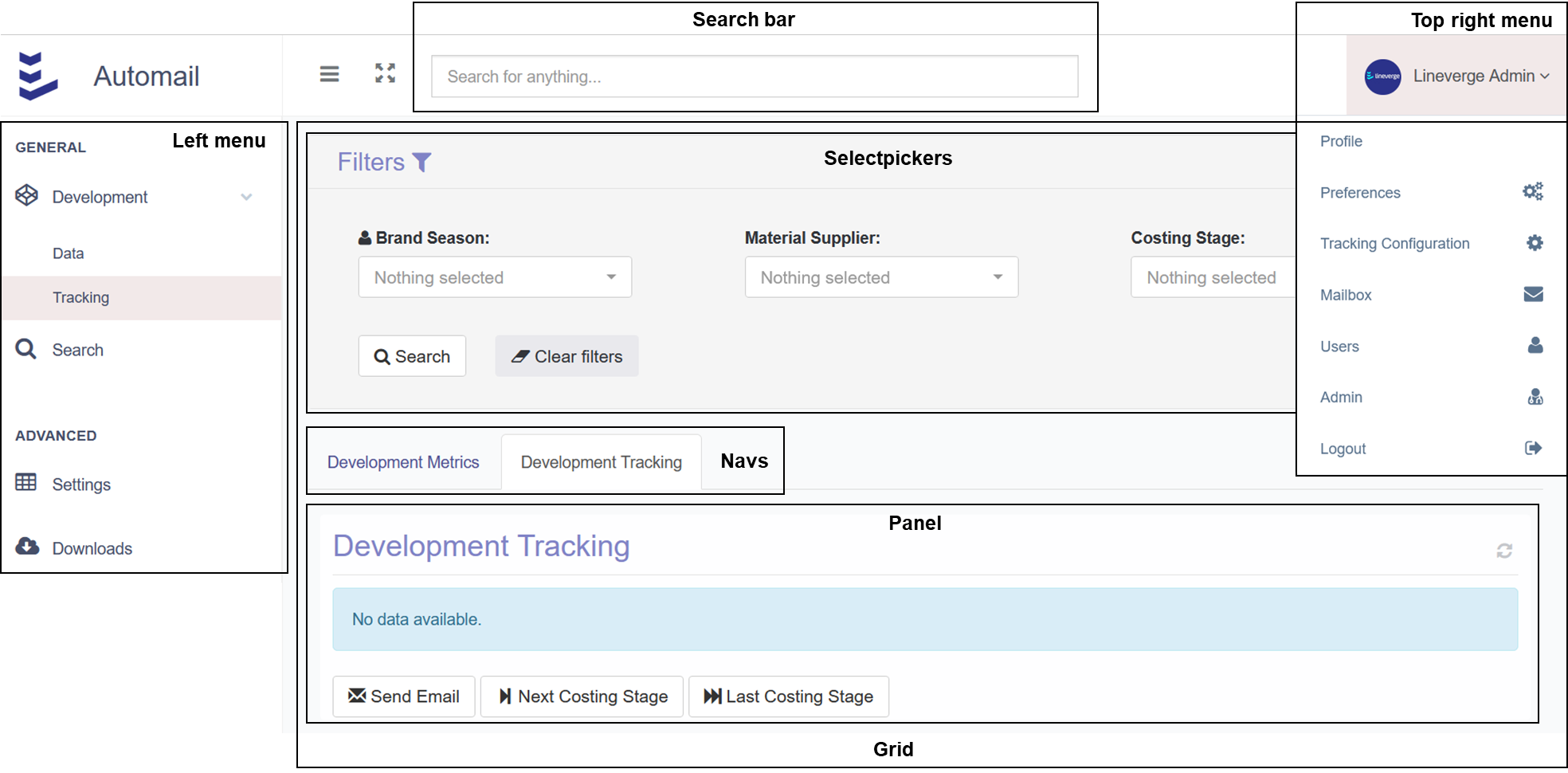
The interface of Automail consists of a left menu (up to 3 levels of submenus), a top menu with a search bar + a dropdown on the right side, and the content.
All controls are set in **urls.py**, in the dictionary CONTROLLERS, which is used in the Automail initiation process when the server boots:
```python
CONTROLLERS = {
'platform': {
'show_searchbar': True,
'show_notifications': False,
},
'left_menu': [],
'top_right_menu': [],
'search': [],
}
```
UI layout
### Permissions
Users and groups are created from the admin page.
{% hint style="info" %}
All UI components have the attributes *allowed\_user\_groups* (for user groups) *and allowed\_users* (for users) to control the component-specific permissions.
By default, all users have permission to a UI component. If at least 1 group is added to *allowed\_user\_groups* or 1 user is added to *allowed\_users*, then only the defined group(s) and user(s) will have access to the component.
Admins (users with the flag superuser set to True in the Automail admin interface) always have access to all components.
{% endhint %}
### Left Menu
*left\_menu* has its menu items as a list of dictionaries.
The following code is an example that displays the left menu above with the corresponding grid content (grid layout, selectpickers, navs and panels):
```python
'left_menu': [
{
'label': 'General',
'children': [
{
'label': 'Development',
'icon': 'codepen',
'allowed_user_groups': [
'Development Group',
],
'allowed_users': [],
'children': [
{
'allowed_user_groups': [
'Development Group',
],
'allowed_users': [],
'label': 'Data',
'url_name': 'grid_development_report_data',
'view': controller_views.GridView,
'view_params': {
'show_selectpickers': False,
'selectpickers_columns': 3,
'selectpickers': [
selectpicker_brand_seasons_active,
selectpicker_productlines,
selectpicker_suppliers,
],
'panels': [
{
'title': 'Development Data',
'subtitle': 'Limited to 100k rows',
'tooltip': 'Please be very careful when editing the data in this table.',
'width': 12,
'full_row': True,
'url_name': 'frame_table',
'url_action_name': 'table_development',
'content': {
'view': custom_views.TableDevelopment,
'view_params': {
'model': custom_models.Development,
'order_by': 'id',
'table_settings': table_settings_development,
'field_definitions': field_definitions_development,
'filter_key_mapping': {
'brand__name': 'season__brand__name',
},
},
},
}
]
},
},
{
'label': 'Tracking',
'url_name': 'grid_development_tracking',
'view': controller_views.GridView,
'view_params': {
'show_selectpickers': False,
'selectpickers_columns': 2,
'selectpickers': [
selectpicker_brand_seasons_active,
selectpicker_suppliers,
],
'navs': [
{
'title': 'Development Metrics',
'panel_names': [
'metrics_monitoring_development',
],
},
{
'title': 'Development Tracking',
'active': True,
'panel_names': [
'tracking_monitoring_development',
],
},
],
'panels': [
{
'title': 'Development Metrics',
'width': 12,
'height': 280,
'full_row': True,
'type': 'bar',
'url_name': 'frame_chartjs',
'url_action_name': 'metrics_monitoring_development',
'content': {
'view': api_views.ChartJSAPIBar,
'view_params': {
'model': custom_models.Monitor,
'decimal_rounding': 0,
'group_by': ['season__season_short', 'request_status'],
'order_by': 'request_status',
'value_style_mapping': {
'Not Sent': {'backgroundColor': '#f1f1f1'},
'Failed Sending': {'backgroundColor': '#f3e4ec'},
'Link Sent': {'backgroundColor': '#f3efdf'},
'Link Opened': {'backgroundColor': '#dee3ee'},
'Development Report Updated': {'backgroundColor': '#deefe4'},
},
'aggregations': [
{'function': 'Count', 'value': 'id'}, # annotation
],
'include_filters_extra': {
'request_category': 'Material Development Report',
},
'filter_key_mapping': {
'brand__name': 'season__brand__name',
'supplier__name': 'monitor__supplier__name',
},
},
},
},
{
'title': 'Development Tracking',
'width': 12,
'full_row': True,
'reload_div': True,
'url_name': 'frame_regular_table',
'url_action_name': 'tracking_monitoring_development',
'content': {
'view': module_views.RegularTable,
'view_params': {
'js_imports': ['control_checkbox'],
'model': custom_models.Monitor,
'order_by': 'id',
'limit': 1000,
'is_empty': False,
'row_style_function': custom_functions.row_style_function_monitoring_status,
'field_definitions': {
'checkbox': {'header_input_type': 'checkbox', 'format': 'checkbox'},
'costing_stage': {'label': 'Costing Stage'},
'request_status': {'label': 'Status'},
'season__brand__name': {'label': 'Brand'},
'season__season_short': {'label': 'Season'},
'supplier__link': {'label': 'Supplier', 'format': 'text_link'},
'request_sent_timestamp': {'label': 'Initial Email', 'format': 'date'},
'request_reminder_sent_timestamp': {'label': 'Reminder', 'format': 'date'},
'request_deadline': {'label': 'Deadline', 'format': 'date'},
'request_last_reply_timestamp': {'label': 'Last Reply', 'format': 'datetime'},
'link_monitor_development': {'label': 'Review', 'format': 'text_link'},
'autoform_link': {'label': 'Autoform', 'format': 'external_link'},
},
'include_filters_extra': {
'request_category': 'Material Development Report',
},
'filter_key_mapping': {
'brand__name': 'season__brand__name',
},
},
},
'footer': {
'buttons': [
{
'type': 'url_action',
'label': 'Send Email',
'icon': 'envelope',
'url': reverse_lazy_panel('action_email_monitor'),
},
{
'allowed_user_groups': [],
'allowed_users': [],
'type': 'url_action',
'label': 'Next Costing Stage',
'icon': 'step-forward',
'dependency_list': 'tracking_monitoring_development',
'url': reverse_lazy_panel('action_monitor_next_costing_stage'),
},
{
'allowed_user_groups': [],
'allowed_users': [],
'type': 'url_action',
'label': 'Last Costing Stage',
'icon': 'fast-forward',
'dependency_list': 'tracking_monitoring_development',
'url': reverse_lazy_panel('action_monitor_next_costing_stage', kwargs={
'category': 'last',
}),
},
],
},
},
]
},
},
],
},
],
},
{
'label': 'Advanced',
'children': [
{
'label': 'Settings',
'icon': 'table',
'url_name': 'grid_table_settings',
'allowed_user_groups': [
'Master Group',
'Superuser',
],
'allowed_users': [],
'view': controller_views.GridView,
'view_params': {
'title': 'Settings',
'panels': [
{
'width': 12,
'full_row': True,
'url_name': 'panel_listgroup_tables',
'content': {
'view': module_views.ListGroup,
'view_params': {
'url_open_new_tab': False,
'context_items': context_items,
},
}
}
]
},
},
{
'label': 'Downloads',
'icon': 'cloud-download',
'url_name': 'grid_downloader',
'allowed_user_groups': [],
'allowed_users': [],
}
]
},
]
```
{% hint style="info" %}
The **Search** menu item comes with Automail by default as it is used for holding all pages that don't have a menu reference (e.g. searching for a factory in the top search bar).
{% endhint %}
{% hint style="info" %}
The level 1 menu items can have icons that use the [font-awesome library](https://fontawesome.com/v4/icons/).
{% endhint %}
### Grid Controllers
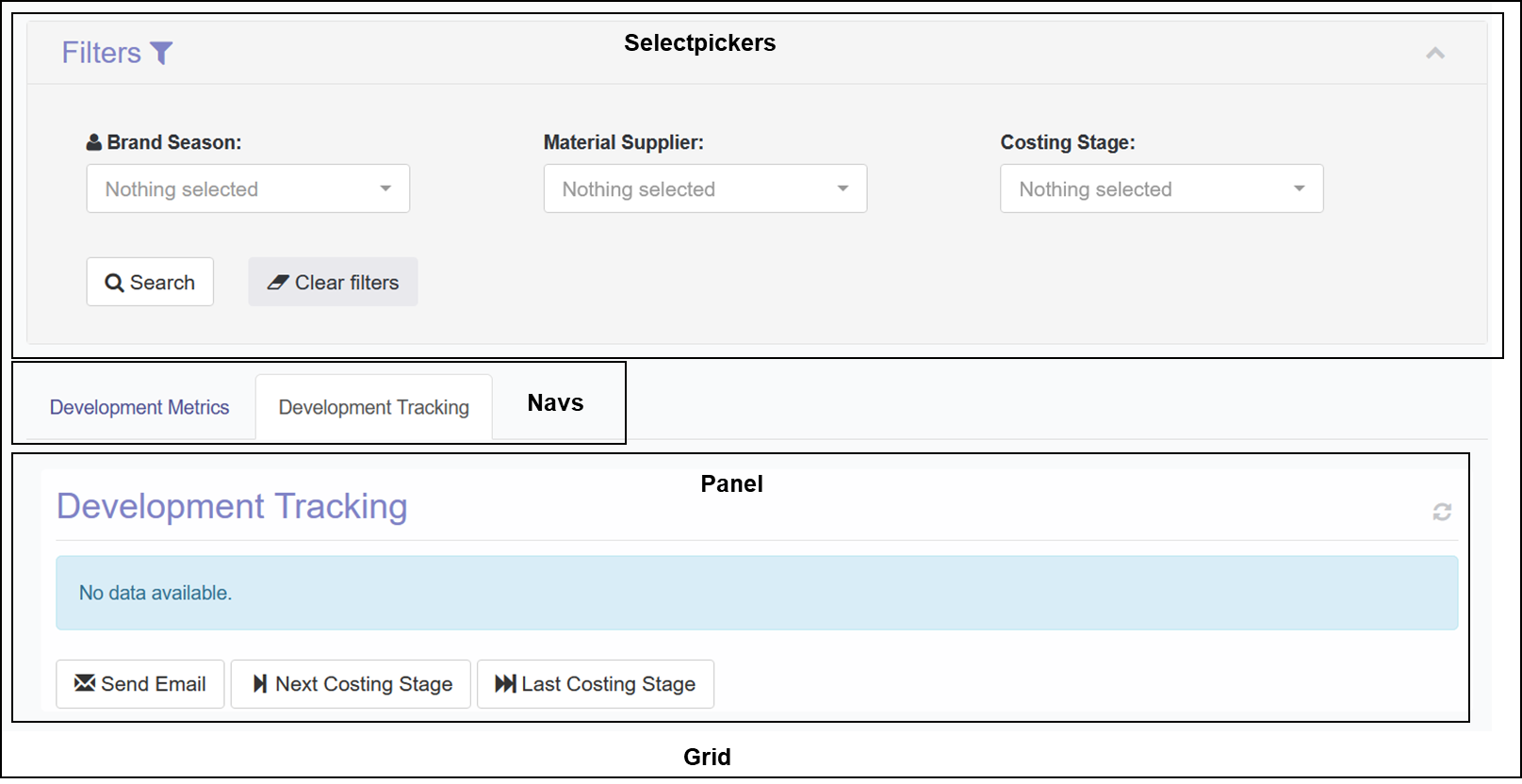
A grid is a container for selectpickers and panels (which can be linked to navs):
Grid layout
The example above is configured with the following code:
```python
{
'label': 'Tracking',
'url_name': 'grid_development_tracking',
'allowed_user_groups': [],
'allowed_users': [],
'view': controller_views.GridView,
'view_params': {
'show_selectpickers': False,
'selectpickers_columns': 2,
'selectpickers': [
selectpicker_brand_seasons_active,
selectpicker_suppliers,
],
'navs': [
{
'title': 'Development Metrics',
'panel_names': [
'metrics_monitoring_development',
],
},
{
'title': 'Development Tracking',
'active': True,
'panel_names': [
'tracking_monitoring_development',
],
},
],
'panels': [
{
'title': 'Development Metrics',
'width': 12,
'height': 280,
'full_row': True,
'type': 'bar',
'url_name': 'frame_chartjs',
'url_action_name': 'metrics_monitoring_development',
'content': {
'view': api_views.ChartJSAPIBar,
'view_params': {
'model': custom_models.Monitor,
'decimal_rounding': 0,
'group_by': ['season__season_short', 'request_status'],
'order_by': 'request_status',
'value_style_mapping': {
'Not Sent': {'backgroundColor': '#f1f1f1'},
'Failed Sending': {'backgroundColor': '#f3e4ec'},
'Link Sent': {'backgroundColor': '#f3efdf'},
'Link Opened': {'backgroundColor': '#dee3ee'},
'Development Report Updated': {'backgroundColor': '#deefe4'},
},
'aggregations': [
{'function': 'Count', 'value': 'id'}, # annotation
],
'include_filters_extra': {
'request_category': 'Material Development Report',
},
'filter_key_mapping': {
'brand__name': 'season__brand__name',
'supplier__name': 'monitor__supplier__name',
},
},
},
},
{
'title': 'Development Tracking',
'width': 12,
'full_row': True,
'reload_div': True,
'url_name': 'frame_regular_table',
'url_action_name': 'tracking_monitoring_development',
'content': {
'view': module_views.RegularTable,
'view_params': {
'js_imports': ['control_checkbox'],
'model': custom_models.Monitor,
'order_by': 'id',
'limit': 1000,
'is_empty': False,
'row_style_function': custom_functions.row_style_function_monitoring_status,
'field_definitions': {
'checkbox': {'header_input_type': 'checkbox', 'format': 'checkbox'},
'costing_stage': {'label': 'Costing Stage'},
'request_status': {'label': 'Status'},
'season__brand__name': {'label': 'Brand'},
'season__season_short': {'label': 'Season'},
'supplier__link': {'label': 'Supplier', 'format': 'text_link'},
'request_sent_timestamp': {'label': 'Initial Email', 'format': 'date'},
'request_reminder_sent_timestamp': {'label': 'Reminder', 'format': 'date'},
'request_deadline': {'label': 'Deadline', 'format': 'date'},
'request_last_reply_timestamp': {'label': 'Last Reply', 'format': 'datetime'},
'link_monitor_development': {'label': 'Review', 'format': 'text_link'},
'autoform_link': {'label': 'Autoform', 'format': 'external_link'},
},
'include_filters_extra': {
'request_category': 'Material Development Report',
},
'filter_key_mapping': {
'brand__name': 'season__brand__name',
},
},
},
'footer': {
'buttons': [
{
'type': 'url_action',
'label': 'Send Email',
'icon': 'envelope',
'url': reverse_lazy_panel('action_email_monitor'),
},
{
'allowed_user_groups': [],
'allowed_users': [],
'type': 'url_action',
'label': 'Next Costing Stage',
'icon': 'step-forward',
'dependency_list': 'tracking_monitoring_development',
'url': reverse_lazy_panel('action_monitor_next_costing_stage'),
},
{
'allowed_user_groups': [],
'allowed_users': [],
'type': 'url_action',
'label': 'Last Costing Stage',
'icon': 'fast-forward',
'dependency_list': 'tracking_monitoring_development',
'url': reverse_lazy_panel('action_monitor_next_costing_stage', kwargs={
'category': 'last',
}),
},
],
},
},
]
},
}
```
The grid attributes are:
* **label** the menu text
* **url\_name** the URL reference of the grid
* **allowed\_user\_groups** the user group permissions
* **allowed\_users** the user permissions
* **view** the generic view *controller\_views.GridView*, which includes all session and security-related configurations
* **view\_params**
* **show\_selectpickers** control the display of selectpickers on grid load (False means the selectpickers are collapsed)
* **selectpickers\_columns** the number of columns in the filter section (TO BE AUTOMATICALLY CALCULATED [Florian Gamper](mailto:undefined))
* **selectpickers** the filters that apply to all panels in the grid
* category - **filter** pre-loaded dropdown list of values with the attributes:
* '**category**': 'filter'
* '**name**': 'supplier\_\_name' (example value) *value used for interacting with the models through queryset include filters*
* **label**': 'Factory/Facility Name' (example value)
* '**live\_search**': True *to display a search box*
* '**action\_box**': True *to display select all/deselect all buttons*
* '**multiple**': True *to allow selecting multiple values*
* Data source options:
* '**queryset**': {'model': custom\_models.Supplier, 'value\_field': 'id', 'label\_field': 'label'} *queryset config to fetch data from a model*
* '**fixed\_values**': \[{'value': True, 'label': 'Yes', 'selected': False}, {'value': False, 'label': 'No', 'selected': False}] *hardcoded dropdown values*
* category - **token** *list of values that are loaded at the time of the search*
* category - **datepicker** *mini-calendar*
* **navs** the tabs right under the selectpickers container, with the attributes:
* '**title**': 'Detected Issues in Questions'
* '**active**': True *the active tab when the page is first loaded*
* '**panel\_names**': \[ 'panel\_suppliersurveymanagementdetectedissue\_supplieranswer'] *list that holds all panels to be part of the nav*
* **panels** list of panels included in the grid
{% hint style="info" %}
If the same UI components repeat across different grids, it is helpful to define those as variables in url\_variables.py (e.g. the exact same supplier filter is used in multiple grids and hence stored in the *selectpicker\_suppliers* variable).
{% endhint %}
### Panel Controllers
{% hint style="info" %}
A **panel** (i.e. the frame including title, height, width, footer, etc.) is different from its **content** (i.e. what is shown inside the panel such as a chart).
{% endhint %}
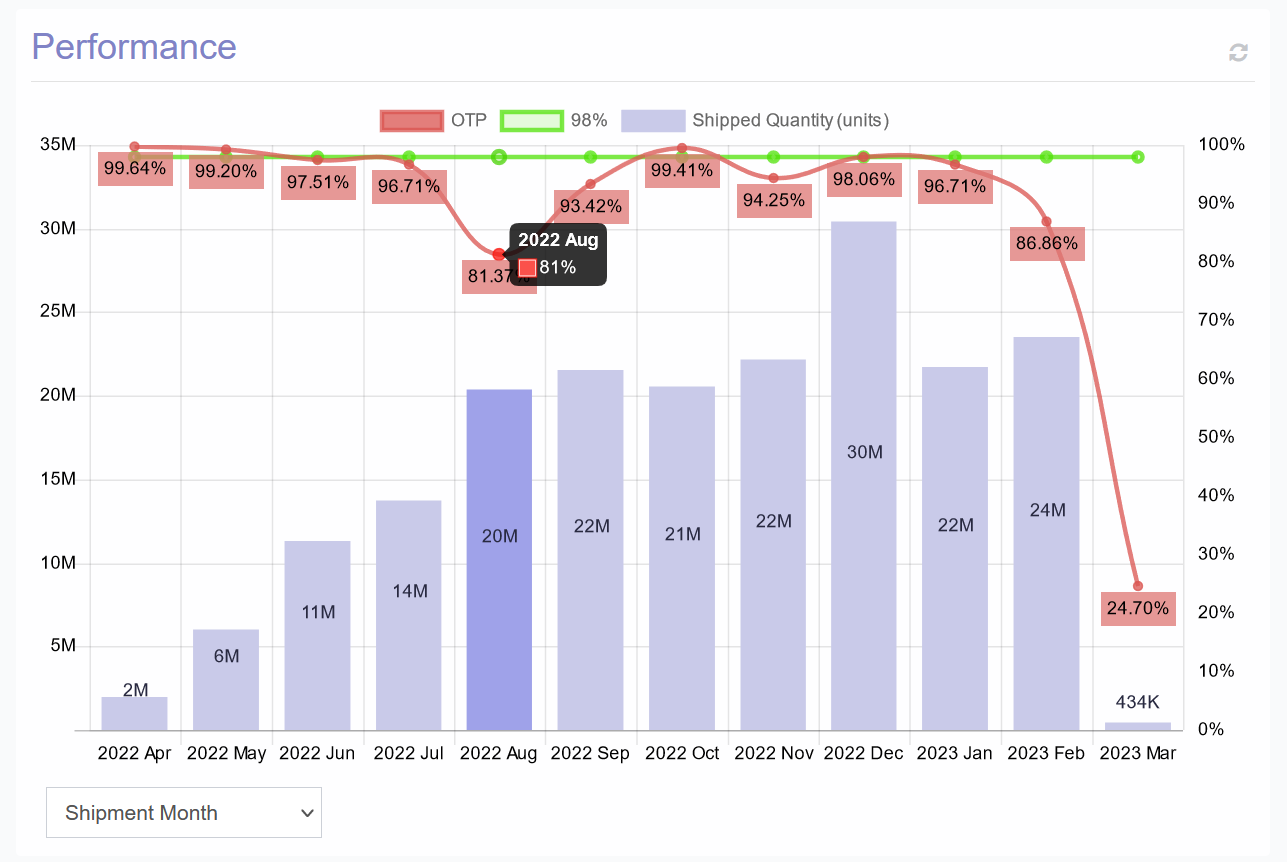
Panels are loaded into a grid asynchronously through AJAX[^1] calls. Each panel is loaded independently from other panels and can be refreshed by using the refresh icon.
Each panel is configured as a dictionary. As an example, the Performance panel above has the following config:
```python
{
'title': 'Performance',
'width': 12,
'height': 450,
'full_row': True,
'type': 'combo_double_y_axis',
'url_name': 'frame_chartjs',
'url_action_name': 'panel_delivery_report_monthly_otp_autoform',
'content': {
'view': custom_views.ChartJSAPIComboOTP,
'url_params_list': [
None,
{'group_by': 'vendor__name'},
{'group_by': 'ready_d_month__year_month_name_short'},
],
'view_params': {
'label_quantity': 'Shipped Quantity (units)',
'month_field': 'ready_d_month',
'model': custom_models.Delivery,
'decimal_rounding': 4,
'limit': 15,
'order_by': '-annotation',
'aggregations': [
{'function': 'Sum', 'value': 'ready_quantity'},
{'function': 'Custom', 'value': Cast(Sum('ontime_quantity'), FloatField())/Cast(Sum('ready_quantity'), FloatField())},
],
'include_filters_extra': {
'monitor__isnull': False,
'ready_quantity__gt': 0,
}
},
},
'footer': {
'select_name': 'group_by',
'select_values': {
'self': 'Material Supplier',
'vendor__name': 'T1 Vendor',
'ready_d_month__year_month_name_short': 'Shipment Month'
}
},
}
```
The core panel attributes are (non-core attributes are described separately):
* **title** visible title of the panel frame (if None, then the panel frame is not visible, only its content)
* **height** in px defined as an integer value
* **width** based on a divider of 12 as used by [Bootstrap](https://getbootstrap.com/docs/4.0/layout/grid/) (full width is 12 and allowed values are 2, 3, 4, 5, 6, 7, 8, 9, 10, and 12)
* **full\_row** to make the panel take the full row width, even if the width is less than 12 [Florian Gamper](mailto:undefined)TO AUTOMATE
* **row\_start** to make the panel start at a new row (only if full\_row is False)
* **row\_end** to make the panel close an existing row (only if full\_row is False and the panel is following another panel that has the row\_start set to True)
* **type** the type of panel used for JavaScript rendering (e.g. 'combo\_double\_y\_axis', 'PieChart', 'regular\_table', 'activityflow', etc. with full list below)
* **url\_name** URL of either the panel content or the panel frame used for rendering (e.g. 'frame\_table', 'frame\_chartjs', etc. with full list below)
* **url\_action\_name** URL of the panel content (only applicable if the url\_name is not referring to a panel frame)
* **footer** the footer content of the panel
* Dropdown (dictionary):
```python
{
'select_name': 'group_by',
'select_values': {
'self': 'Material Supplier',
'vendor__name': 'T1 Vendor',
'ready_d_month__year_month_name_short': 'Shipment Month'
}
}
```
* Buttons (list of dictionaries):
```python
'buttons': [
{
'allowed_user_groups': [
'Editor Group',
'Viewer Group',
],
'type': 'url_action',
'label': 'Queue',
'icon': 'plus',
'dependency_list': 'panel_follow_up_review_tracking',
'url': reverse_lazy_panel('action_monitor', kwargs={
'category': 'is_in_queue_True',
}),
},
{
'allowed_user_groups': [
'Editor Group',
'Viewer Group',
],
'type': 'url_action',
'label': 'Queue',
'icon': 'minus',
'dependency_list': 'panel_follow_up_review_tracking',
'url': reverse_lazy_panel('action_monitor', kwargs={
'category': 'is_in_queue_False',
}),
},
{
'allowed_user_groups': [
'Editor Group',
'Viewer Group',
],
'type': 'url_action',
'label': 'Remark',
'icon': 'floppy-disk',
'url': reverse_lazy_panel('action_monitor', kwargs={
'category': 'survey_remark',
}),
},
]
```
* **content** the content of the panel
### Filter content
### Panel Content
The config of a panel's panel **content** depends on the type of content.
{% content-ref url="/pages/Q7BPEDKk37SwcvW04WL5" %}
[Selectpickers](/automail/configurations/ui-configuration/site/selectpickers.md)
{% endcontent-ref %}
{% content-ref url="/pages/coQj1rHhu7rqGGwnCZbR" %}
[Panels](/automail/configurations/ui-configuration/site/panels.md)
{% endcontent-ref %}
[^1]: AJAX stands for Asynchronous JavaScript And XML. In a nutshell, it is the use of the XMLHttpRequest object to communicate with servers. It can send and receive information in various formats, including JSON, XML, HTML, and text files.