> For the complete documentation index, see [llms.txt](https://docs.lineverge.com/automail/llms.txt). Markdown versions of documentation pages are available by appending `.md` to page URLs; this page is available as [Markdown](https://docs.lineverge.com/automail/installation/ecs.md).
# ECS
Deploy Automail using Terraform for PROD and UAT usage.
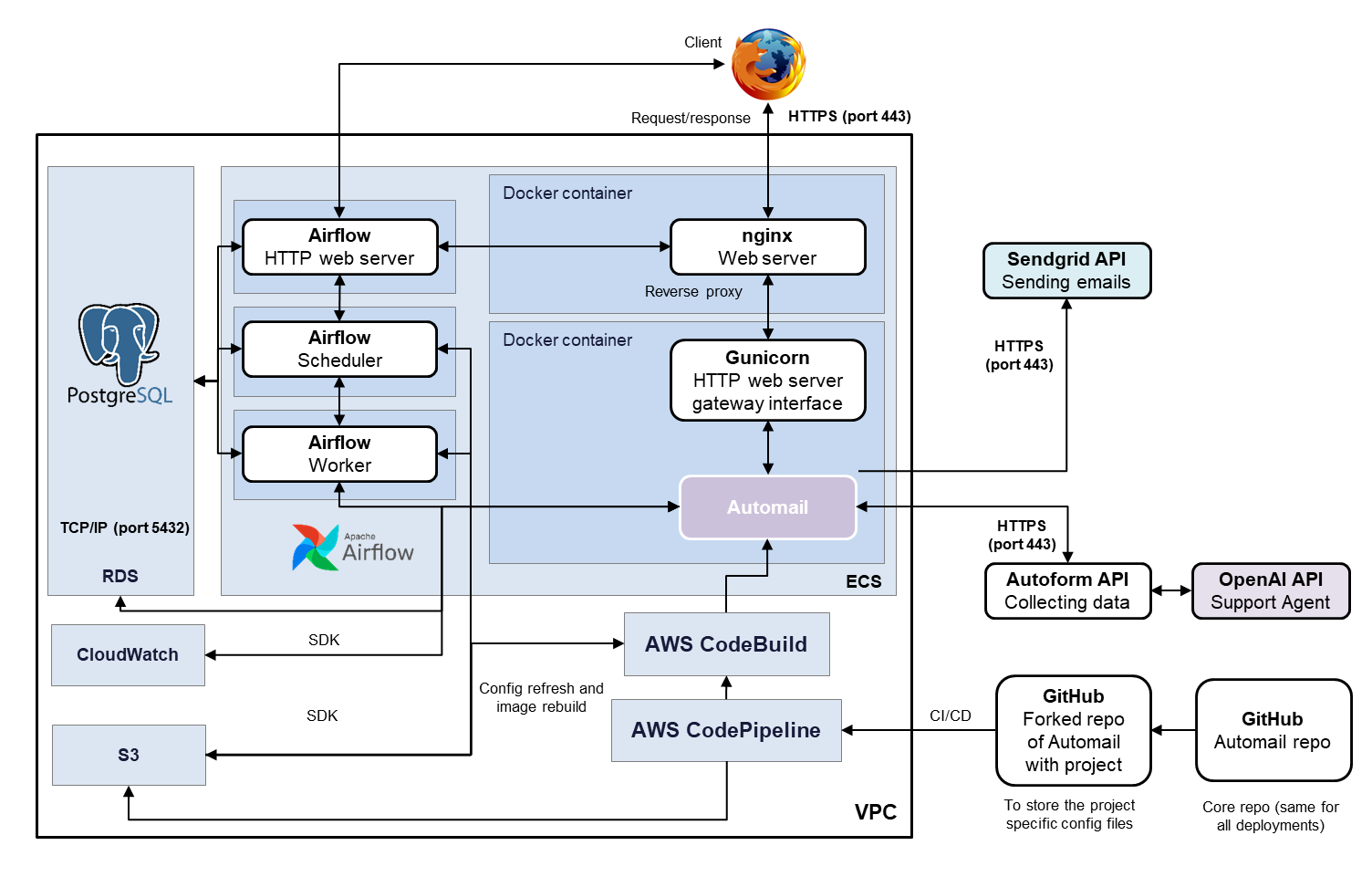
The following steps will install Automail in a Docker environment running on [Amazon Elastic Container Service](https://aws.amazon.com/ecs/) (ECS) with Gunicorn as the web application server, nginx as the reverse proxy, and a PostgreSQL database hosted in RDS. The workflows are managed by [Airflow](https://airflow.apache.org/), with a dedicated control interface.
The installation will set up a CI/CD pipeline connected to the master branch of the instance's GitHub fork. This means every push to the main branch will deploy the change automatically.
{% hint style="info" %}
The default top-level domain for containerized deployments is **lineverge.io**, and all instances will automatically have a wildcard SSL certificate enrolled.
{% endhint %}
## Infrastructure
The high-level infrastructure is represented in the following diagram:
## Deployment
{% hint style="warning" %}
**It is important to keep the stack names aligned with the forked repo name.**
E.g. if the forked repo name is "automail-lv-cookie", then the AWS service name (i.e. service\_name below) must also be exactly "automail-lv-cookie".
{% endhint %}
1. Create a new file deployment\container\terraform\\**settings.tfvars**. The file should define the following variables, which will be used for the deployment:
```
account_id = the AWS account ID
region = the AWS region of the instance (e.g. "us-east-1")
service_name = the name of the instance in lower case and without numbers of underscores (e.g. "automail-lv-cookie")
stage = the instance stage (e.g. "prod")
repository_id = the ID of the forked Automail repository for the instance (e.g. "Lineverge/automail-lv-cookie")
connection_arn = the ARN to the GitHub connection
custom_domain = the target domain to be set up in route 53 (e.g. "cookie.lineverge.io")
secret_key = the Automail session secret value used as a salt for hashing user sessions (can be an arbitrary value)
sendgrid_apikey = the API key for using Sendgrid to send emails
autoform_token = the Autoform API access token
serial_number = the serial number of the instance
company_name = the instance customer company name
application_name = the instance label (e.g. "Automail Cookie")
application_name_short = the instance short label (e.g. "Cookie")
database_password = the RDS database password
```
2. Deploy Automail by navigating to deployment\container\terraform folder and running:\
`terraform init`\
`terraform apply -var-file="settings.tfvars"`\
This will take around 30 minutes to complete.
Congrats! Your Automail instance is deployed with a dedicated deployment pipeline:tada:
For any updates, simply commit your changes and push to the main GitHub branch. This will trigger the pipeline, which can take 8 minutes to complete and be visible within the application.
### Workflows
Workflows are set up as Airflow [DAGs](https://airflow.apache.org/docs/apache-airflow/stable/core-concepts/dags.html) that run on MWAA. The schedule of each task must be defined in the project-specific **project/\[workflow].py** file, which has the following syntax:
The workflow executable Python files (e.g. uploadfile\_order.py above) must be stored within the **project** folder and follow the proper DAG syntax (using the Automail wrapper).
Below is an example of a DAG, which will run on a 10 minutes' interval:
```python
from configurations.workflow_env import *
def test_queryset():
print("!!!!", custom_models.ReportCategory.objects.all())
dag = schedule_airflow_tasks(
dag_id="test_dag",
task_configs=[
{
"python_callable": test_queryset,
"op_kwargs": {},
},
],
schedule_interval=timedelta(minutes=10),
tags=["Test"],
)
```
## Deletion
To delete the environment, run the following command:
`terraform destroy -var-file="settings.tfvars"`
{% hint style="danger" %}
**Careful!** This will completely destroy the environment including all database data. Make sure to make a backup first for all data that needs to be kept.
{% endhint %}
## Debugging
### Container Level
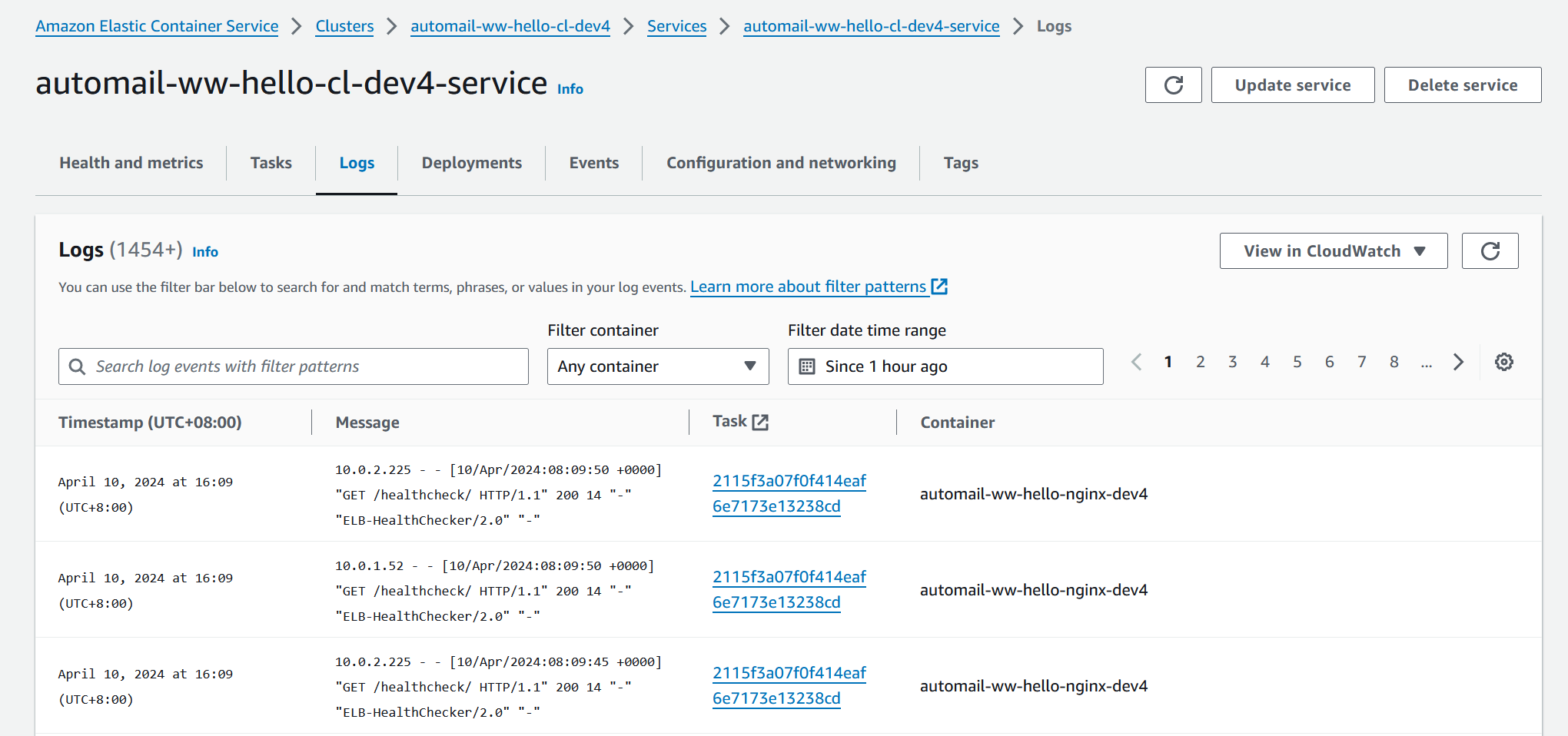
For any issues related to the containers, consult the logs in ECS.
ECS logs section
### Application Level
Application logs are accessible in **CloudWatch**. Use the log function for that purpose in the Python files.
Example:
```python
from utilities.api_utils_aws import log
log("Workflow is working!!!", log_stream_name="airflow")
```